mmWave Radar AI Assistant with ChatGPT Vision
Last Updated on August 9, 2026 by Engr. Shahzada Fahad
https://youtu.be/K6qr302DYOo
I was sitting at my desk testing the radar’s detection range when the assistant spoke first — I hadn’t touched anything. That’s the moment I knew this project actually worked the way I wanted it to. No wake word, no button, just walk in and it starts talking to you.
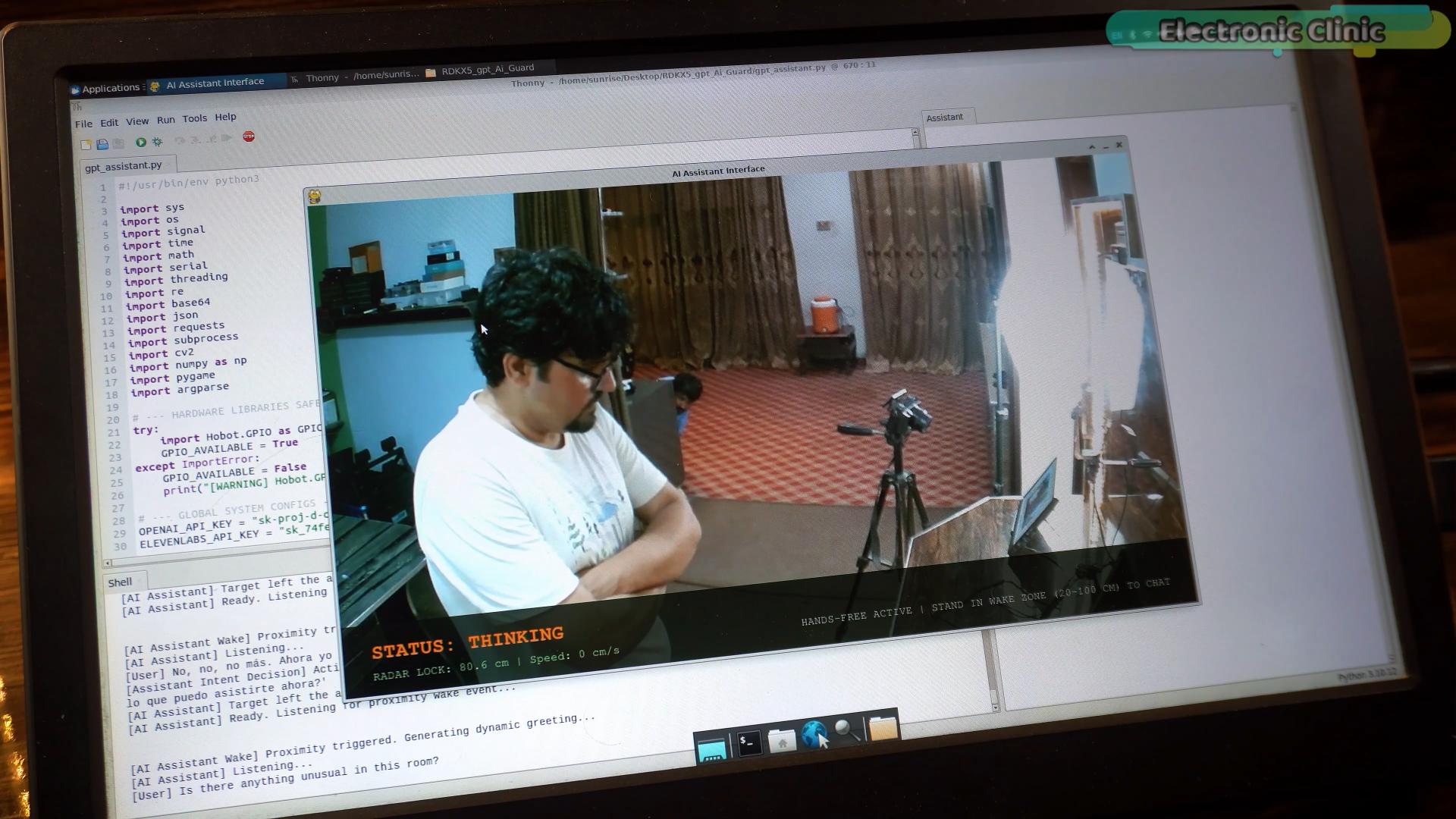
This is my second radar-triggered AI assistant. The first one used DeepSeek and ElevenLabs, and I pushed it hard enough to turn it into an assistant for visually impaired users. This time I rebuilt it around ChatGPT and GPT-4o, running on the RDK X5, because I ran into a wall with the previous version that I want to explain properly here.
Table of Contents
Why I Switched from DeepSeek to ChatGPT
DeepSeek doesn’t process images. In my earlier build, all the “seeing” was actually being done by an object detection model running on the RDK X5, and that model only recognizes objects from the COCO dataset — about 80 categories. The real world has a lot more than 80 things in it.
GPT-4o solves that because it can look at an image and describe what’s actually there, not just match it against a fixed list. The tradeoff is speed — this isn’t the setup you’d want for something that needs a real-time response, like counting boxes on a conveyor belt. For that, train a dedicated model; it’ll be faster and more reliable. But for an assistant meant to understand whatever’s in front of it, GPT-4o was the better call.
How the Radar Triggers the Assistant Without a Wake Word
The hardware side is close to what I used last time: an RD-03D mmWave radar connected to a Xiao ESP32-C3, which talks to the RDK X5 over USB.
The moment the radar detects someone in range, it signals the RDK X5 and the assistant activates on its own. No “Hey ChatGPT,” no button. That’s really the whole point of pairing radar with an LLM — presence becomes the trigger instead of a keyword.
What It Can Actually Do
Everything in the demo was live — I didn’t script the questions ahead of time. Once it’s triggered, it can:
- Hold a real conversation
- Look through the USB camera and describe the room using GPT-4o vision
- Count people, read text, spot specific objects
- Translate a phrase on the spot
- Control hardware — I wired an LED to GPIO 37 and can turn it on or off just by asking
The moment that actually caught me off guard was when I asked, “Is there anything unusual in this room?” Someone was hiding behind the cupboard just out of my direct line of sight — and GPT-4o spotted them anyway, right through the camera feed. That’s exactly the kind of thing the old COCO-based object detection setup would have completely missed.
Getting the OpenAI API Key Set Up
This was my first time working with the ChatGPT API after using DeepSeek for the previous build. Setup is straightforward: sign in at platform.openai.com, add billing details, and load credit — I started with $5, which was more than enough for testing. I turned off auto-recharge so I could keep manual control over spending, then generated a new secret key from the API Keys section.
Hardware Used
RDK X5 Development Board
RDK Stereo Camera
HD USB Cameras
HDMI Screen
Keyboard and Mouse
Seeed Studio XIAO ESP32C3
RD-03D mmWave Radar Module
DISCLAIMER: This video and description contain affiliate links, which means that if you click on one of the product links, I will receive a small commission. This helps support the channel and allows me to continue to make videos like this. Thank you for your support!
********
Get the Source Code
Full Python code for this build — the RDK X5 assistant logic, the Xiao ESP32-C3 radar firmware, and the GPIO control code — is on my Patreon for $1. That also gets you the source code for every other project on this channel.
Discover more from Electronic Clinic
Subscribe to get the latest posts sent to your email.